From Idea to App Store: What Really Happens During Mobile App Development

Ankit Patel

August 27, 2026

10 min read

Table of contents
- Start With Your RAG Project Requirements
- What Separates a RAG Specialist?
- Technical Capabilities Your RAG Partner Should Have
- How Much Does RAG Development Cost?
- RAG Development Company vs Freelance RAG Developer
- RAG Development Company Selection Checklist
- Frequently Asked Questions
- Conclusion
Every successful mobile app starts with something simple: an idea.
Maybe a business owner sees a problem customers keep facing. Maybe a startup has spotted an opportunity that existing apps haven't solved well. Or perhaps an established company wants to give customers a faster way to buy, book, communicate, or manage a service.
But an idea is only the starting point.
Between writing the first concept on paper and seeing an app available on the App Store or Google Play, there is a long chain of decisions, design work, development, testing, security checks, and improvements.
And in 2026, that journey has become even more interesting.
Artificial intelligence, cloud services, real-time data, advanced APIs, cross-platform frameworks, and increasingly demanding user expectations have changed what modern applications can do—and what businesses need to consider before launching one.
The scale of the mobile market makes those decisions important. Data.ai's State of Mobile 2025 reported that consumers spent 4.2 trillion hours in mobile apps during 2024, showing just how much time people now spend interacting with software through their phones.
So, what actually happens between an app idea and its launch?
Let's walk through the process.
1. It Starts With a Problem, Not a Feature List
One of the easiest mistakes is to start with features.
A business might say:
“We need login, chat, payments, notifications, maps, and an AI chatbot.”
But that doesn't explain why the app should exist.
Strong mobile products usually begin with a clearer question:
What problem are we solving, and who has that problem?
For example, a food delivery company may discover that customers struggle to find meals that match specific dietary preferences. A logistics company may need a better way for drivers to receive and update delivery information. A healthcare provider may want patients to schedule appointments without calling the reception desk.
Once the problem is clear, the development team can identify which features genuinely help solve it.
This stage may involve:
- Market research
- Competitor analysis
- User interviews
- Customer feedback
- Business requirements
- Target audience research
- MVP planning
It is to determine what needs to be built first.
2. The Idea Becomes a Product Plan
Once the problem has been validated, the idea needs structure.
This is where product planning begins.
The team decides what the application should do, how users will move through it, what information the system needs, and which platforms should be supported.
A typical planning exercise might define:
- Core features
- User roles
- User journeys
- Admin functionality
- Backend requirements
- Third-party integrations
- Payment requirements
- Security requirements
- Analytics
- Future expansion plans
This stage also helps establish an MVP, or minimum viable product.
An MVP isn't necessarily a cheap or incomplete application. It is a focused version containing the functionality needed to test whether the product solves a real problem.
A business can spend months building dozens of features that users don't need. A focused MVP gives the team an opportunity to learn earlier and make better decisions with real user feedback.
3. UX Design Turns Requirements Into an Experience
But UI design isn't simply about choosing colors, fonts, icons, and attractive screens.
The bigger question is: How easily can someone accomplish what they opened the app to do?
Designers map user journeys and create wireframes before developing the final interface.
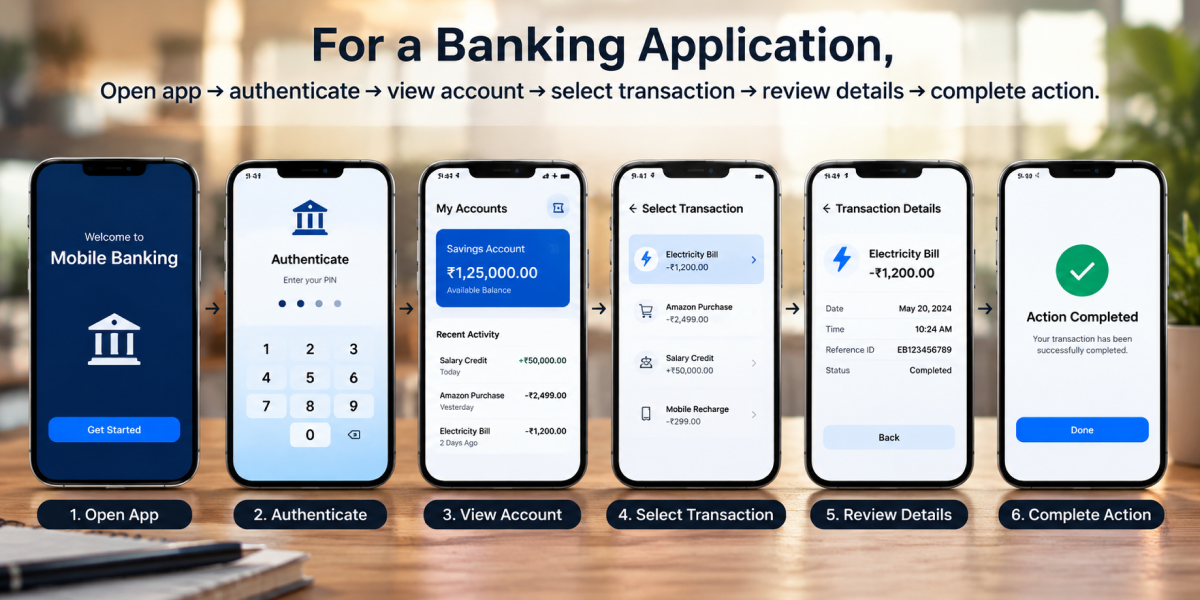
For a banking application, for example, the experience might involve:
Open app → authenticate → view account → select transaction → review details → complete action.
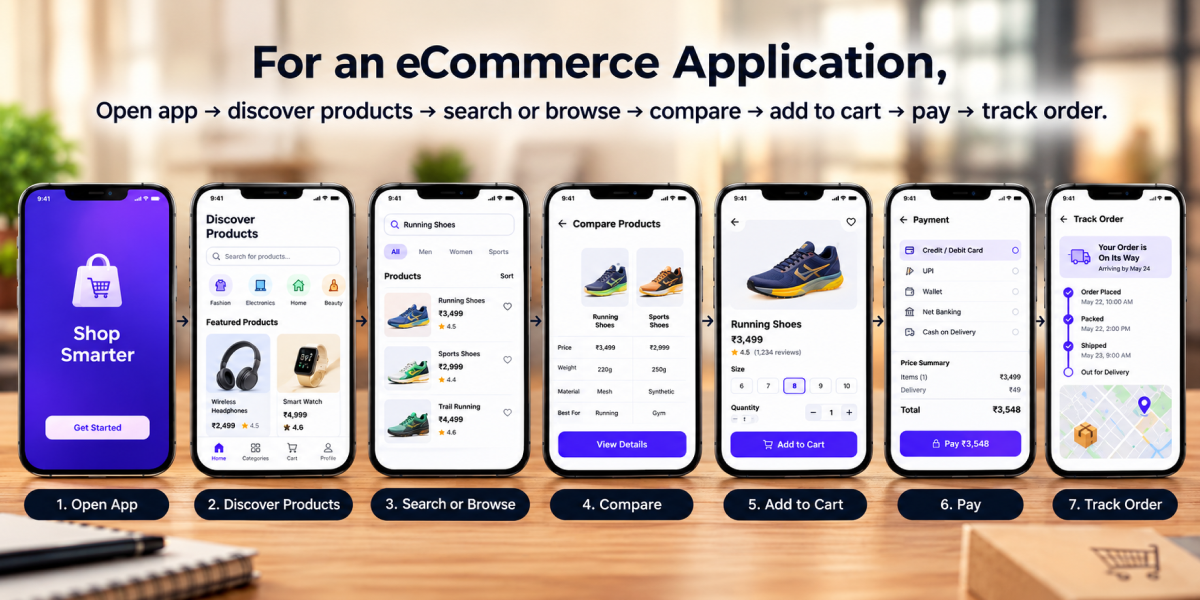
For an eCommerce application:
Open app → discover products → search or browse → compare → add to cart → pay → track order.
Each step needs to make sense.
Good mobile UX considers navigation, accessibility, screen size, loading states, error messages, touch interactions, readability, and the user's context.
The best interface often feels obvious.
Users don't need to think about where to tap next.
4. Choosing the Right Development Approach
Now comes one of the major technical decisions: how should the application be built?
Businesses commonly consider native app development or cross-platform app development.
Native development involves creating applications specifically for platforms such as Android or iOS. This can provide strong access to platform-specific capabilities and can be useful for applications where performance or deep device integration is especially important.
Cross-platform development allows teams to build applications for multiple platforms while sharing a significant portion of the codebase.
Frameworks such as Flutter and React Native have become popular options for businesses looking to develop for both Android and iOS efficiently.
There isn't one universally correct choice. The decision depends on:
- Required performance
- Device capabilities
- Budget
- Development timeline
- Target audience
- Platform requirements
- Product complexity
- Long-term maintenance
This is one area where experienced mobile app development services can help businesses avoid making a technology decision based purely on popularity.
5. The Part Users Don't See: Backend Development
What users see on their phones is only one part of an application.
Behind every serious mobile app is a backend that manages information and business logic.
Depending on the product, the backend may handle:
- User accounts
- Authentication
- Databases
- Payments
- Orders
- Messaging
- Notifications
- File storage
- APIs
- Business rules
- Analytics
- Third-party services
Imagine an eCommerce app.
When a customer places an order, the mobile interface doesn't magically process everything itself. Information travels between the app, backend systems, payment services, inventory systems, and potentially shipping platforms.
The mobile application is essentially one part of a much larger technology ecosystem.
That is why backend architecture needs to be considered early rather than treated as an afterthought.
6. AI Is Becoming Part of the Development Conversation
This is where modern mobile development starts to look very different from a few years ago.
Businesses can now build applications that do more than follow fixed instructions.
AI can help mobile applications understand language, analyze images, personalize recommendations, summarize information, recognize speech, and automate certain workflows.
For example, an AI-powered travel application could understand a request such as:
“Plan a three-day family trip with activities suitable for young children.” Instead of requiring the user to navigate through multiple filters, the app could interpret the request and generate relevant recommendations.
For example, an AI-powered travel application could understand a request such as:
“Plan a three-day family trip with activities suitable for young children.”
Instead of requiring the user to navigate through multiple filters, the app could interpret the request and generate relevant recommendations.
Other practical applications include:
- AI-powered customer support
- Intelligent search
- Personalized recommendations
- Voice assistants
- Document analysis
- Predictive analytics
- Image recognition
- Automated content generation
- AI-powered product discovery
- Intelligent workflow automation
But adding AI doesn't automatically make an application better.
The technology should serve a clear user or business need.
A well-designed AI feature that saves users five minutes every day can be more valuable than an impressive-looking chatbot that nobody needs.
7. APIs Connect the App to the Outside World
Modern applications rarely operate in isolation.
They often need to communicate with payment gateways, maps, social platforms, CRMs, analytics tools, cloud services, shipping providers, authentication systems, and AI platforms.
APIs make these connections possible.
For example, a restaurant application might connect to:
- Payment APIs
- Location services
- Food delivery systems
- Push notification services
- Customer relationship software
- Analytics platforms >
AI applications may also connect to large language model APIs, speech services, vector databases, or machine learning systems.
The development team needs to determine which integrations are necessary, how data moves between systems, what happens when an external service fails, and how those connections are secured.
A smooth user experience often depends on all of these invisible pieces working together.
8. Security Has to Be Built Into the App
Security isn't something that should be added shortly before launch.
Mobile applications can handle valuable information such as names, addresses, payment details, business data, conversations, documents, and location information.
That makes security an important part of the development process from the beginning.
Depending on the application, teams may need to address:
- Secure authentication
- Authorization
- Data encryption
- API security
- Secure data storage
- Session management
- Device permissions
- Payment security
- Privacy controls
- Vulnerability testing
AI applications add another layer of consideration because businesses need to understand what data is sent to AI services, how it is processed, where it is stored, and who can access it.
For businesses investing in custom mobile app development, security should be treated as a product requirement—not simply a technical checklist.
9. Testing Starts Before the App Reaches the Store
An application can look perfect on one device and behave differently on another.
Different operating systems, screen sizes, network conditions, device capabilities, and user behaviors can expose problems that aren't obvious during development.
That is why mobile app testing covers multiple areas.
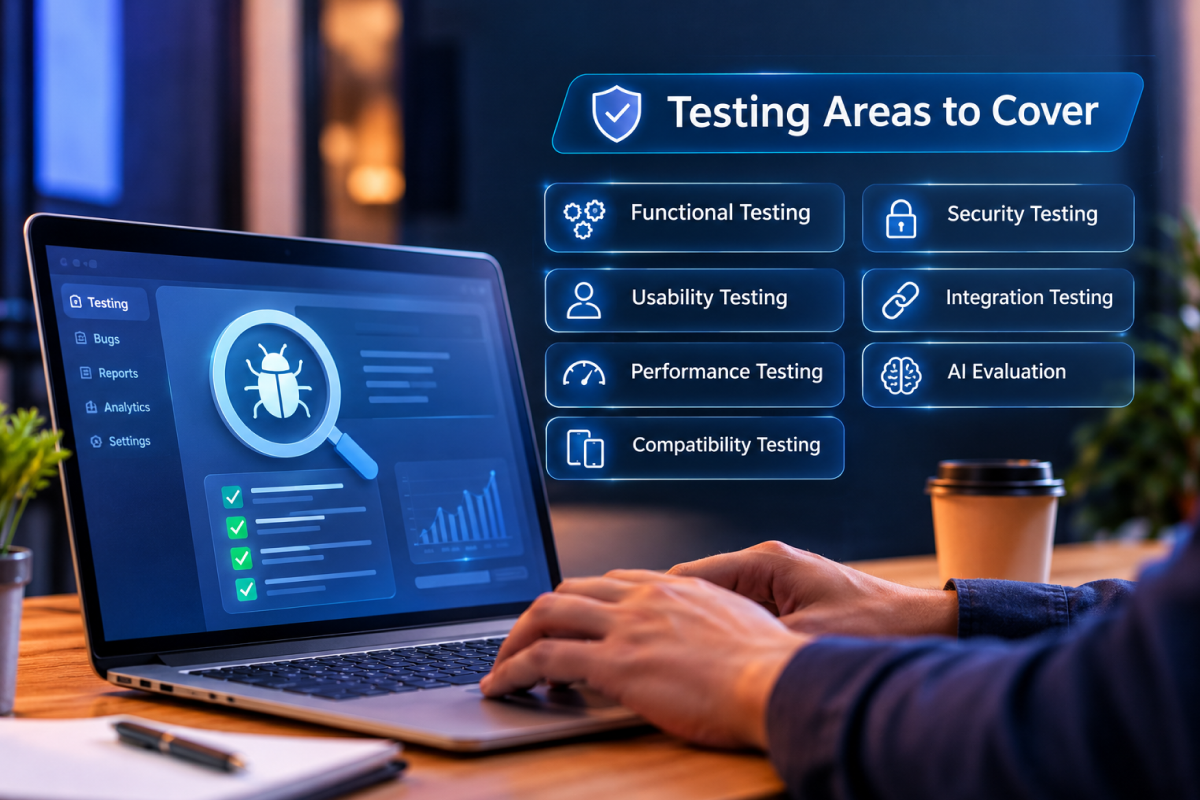
Does every feature behave as expected?
Can users complete tasks without confusion?
Does the app remain responsive under different conditions?
Does it work correctly across supported devices and operating-system versions?
Can unauthorized users access protected information?
Do external services and APIs work correctly?
For AI-enabled features, teams may test response quality, accuracy, consistency, latency, safety, and failure cases.
Testing is not about proving that an app will never have a problem.
It's about finding problems before users do.
10. Preparing the App for the App Store and Google Play
After development and testing, the application still isn't automatically ready for the public.
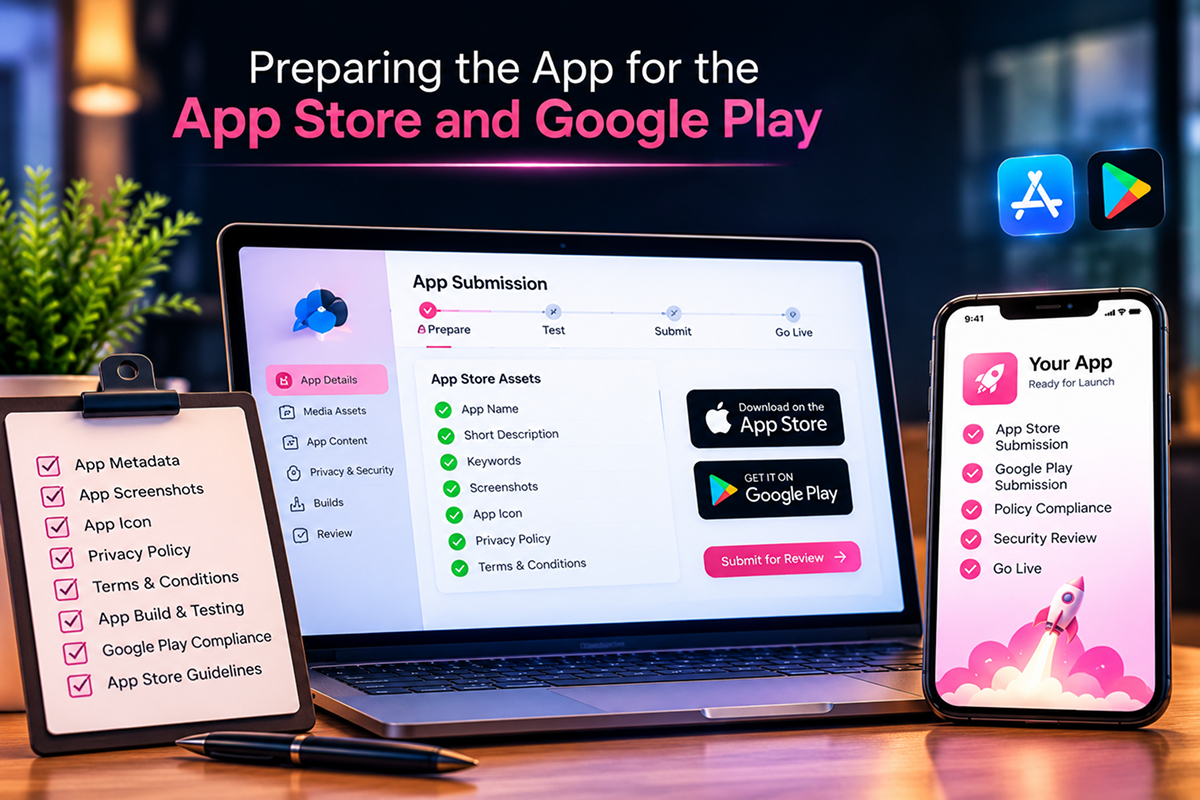
It needs to be prepared for distribution.
That includes things such as:
- App name
- App description
- Screenshots
- App icon
- Privacy information
- Age or content ratings
- Required permissions
- Store metadata
- Build configuration
- Release version
- Platform-specific requirements
Apple and Google each have their own submission and review processes.
A rejection at this stage can delay a launch, especially if the application doesn't meet platform requirements or contains issues that need to be corrected.
That's why store preparation should be considered part of the development timeline rather than something to think about on launch day.
11. Launch Day Is Actually the Beginning
There is a common misconception that mobile app development ends when the application appears in the App Store.
In reality, that's when real-world learning begins.
Once customers start using the application, businesses can see things that weren't obvious during development.
Perhaps users abandon a particular screen.
Maybe a feature isn't being used.
A particular device has unexpected performance problems.
Users may request a capability the product team never considered.
Analytics, reviews, crash reports, customer support requests, and user behavior can reveal these patterns.
That information should feed the next development cycle.
Post-launch work can include:
- Bug fixes
- Performance improvements
- Security updates
- OS compatibility updates
- New features
- UX improvements
- Analytics
- AI model or prompt improvements
- Infrastructure scaling
- Ongoing maintenance
A successful application is rarely “finished.”
It evolves.
Why Choosing the Right Mobile App Development Services Matters
By now, it should be clear that building a mobile app involves much more than writing code.
It combines product strategy, UX design, mobile engineering, backend architecture, APIs, security, testing, deployment, analytics, and ongoing support.
That's why businesses evaluating mobile app development services should look beyond a company's ability to produce an app quickly.
A capable development partner should understand the complete product lifecycle.
Questions worth asking include:
- Have they worked on applications similar to yours?
- Can they support both iOS and Android?
- How do they approach UI/UX?
- What is their backend development capability?
- Can they integrate AI where it genuinely adds value?
- How do they handle security?
- What testing process do they follow?
- Can they support deployment?
- What happens after launch?
- Can the application scale as the business grows?
The right partner can help turn a rough concept into a product that is technically sound and useful to its intended audience.
How Long Does Mobile App Development Take?
There isn't one fixed answer.
A simple application with a limited number of screens and basic functionality may take considerably less time than a marketplace, fintech platform, healthcare application, or AI-powered enterprise product.
Timeline depends on:
- Number of features
- Design complexity
- Platforms
- Backend requirements
- Third-party integrations
- AI functionality
- Security requirements
- Testing scope
- Team size
- Approval requirements
Trying to estimate development time before defining the scope can therefore be misleading.
A better approach is to break the project into stages and estimate each major component.
What Makes a Mobile App Successful?
Technology alone doesn't determine whether an app succeeds.
A technically impressive application can still fail if it solves the wrong problem.
Successful mobile applications generally combine several things:
A clear purpose. Users know why they need the app.
A simple experience. Important actions don't require unnecessary steps.
Reliable performance. The app works consistently.
Useful features. Functionality solves real problems rather than filling a feature list.
Strong security. Users can trust the application.
Continuous improvement. The product evolves based on real-world feedback.
AI can strengthen some of these areas, but it isn't a replacement for product thinking.
From an Idea on Paper to an App in Someone's Hand
The journey from idea to App Store is much longer than the coding phase.
It begins by understanding a problem.
Then comes product planning, user research, UX design, technology selection, frontend development, backend architecture, API integration, security, AI integration where appropriate, testing, deployment, and continuous improvement.
Each stage affects the next.
A rushed planning phase can create development problems. Poor UX can reduce adoption. Weak backend architecture can make scaling painful. Inadequate testing can damage user trust. And treating launch as the finish line can leave valuable opportunities for improvement unexplored.
Modern mobile application development is therefore less about simply creating an app and more about building a complete digital product around a user's needs.
And with AI becoming part of the mobile technology landscape, businesses have even more possibilities to explore—from intelligent search and personalization to conversational interfaces and automated workflows.
The important thing is knowing where those technologies genuinely belong.
Because the goal isn't simply to get an app into the App Store.
The goal is to build an app that people have a reason to open, a reason to trust, and a reason to keep using.

You May also Like

Rag Development Services
How to Choose a RAG Development Company for Your Business
- Ankit Patel
- |
- August 13, 2026

AI Development Services
AI Taxi App Development: Features, Cost & Development Guide
- Ankit Patel
- |
- August 4, 2026